Inventory & availability
Define individual assets, equipment categories, serial numbers and yard locations. Separate available, reserved, on-hire and maintenance states so a quotation does not become an accidental double booking.

Equipment rental CRM and business management software should connect the customer enquiry to the equipment that actually leaves your yard. Plan one workflow for availability, rental periods, dispatch and returns.
Equipment Rental CRM · Proposed workflow & solution scope
A booking in a sales spreadsheet, a dispatch note in the yard and a maintenance log in another file can describe three different versions of the same asset. Extensions and partial returns make the gap larger. Start with one asset record and a clear handoff between sales, operations and accounts.
Overlapping rental periods hide double bookings.
Unrecorded returns leave equipment unavailable on paper.
Maintenance and operator assignments get lost between teams.
For equipment hire companies, plant rental teams, fleet coordinators and rental businesses managing assets across customer projects.
Build the rental process around asset status, customer commitments and project dates. A discovery session should establish whether you hire by item, quantity, day, week or project, and how extensions, damage and downtime affect billing.
Proposed solution scope: every feature below needs confirmation in a relevant demo and a written agreement.
Use these requirements to evaluate fit. Discuss the records, rules and exceptions behind each module.
Define individual assets, equipment categories, serial numbers and yard locations. Separate available, reserved, on-hire and maintenance states so a quotation does not become an accidental double booking.
Keep site contacts, customer requirements and project addresses beside the quote. Specify hire rates, transport charges, rental periods and exclusions before turning an approved quotation into a contract.
Record agreed start and end dates, extensions, minimum hire terms and return conditions. Keep a revision history so operations and accounts work from the same agreement.
Plan delivery and collection, assign an operator where required and record handover condition. Partial returns need item-level dates, meter readings and damage notes rather than closing the whole contract.
Link cross-hire suppliers, service records and repair costs to the equipment. Block equipment from new bookings while it is under inspection or repair; decide who can release it back into stock.
Agree how recurring hire, overtime, off-hire dates and damage become invoice lines. Compare booked days, downtime, outstanding invoices and utilization by asset or category without assuming every idle day is billable.
A practical sequence to validate against your current process, including the exceptions your team handles every day.
Capture project dates, site access, equipment requirements and the person authorized to approve hire.
Check availability, issue a quotation and confirm the rental period and commercial terms.
Record handover, operators and equipment condition; track extensions against the original booking.
Inspect returned items, schedule maintenance and reconcile actual hire periods before invoicing.
Review the source demo interface alongside the workflow your team needs. Agree the exact modules and exceptions before making a commitment.
These source demos use fictional records, sample currencies and simulated actions. They do not confirm production availability or universal feature support.
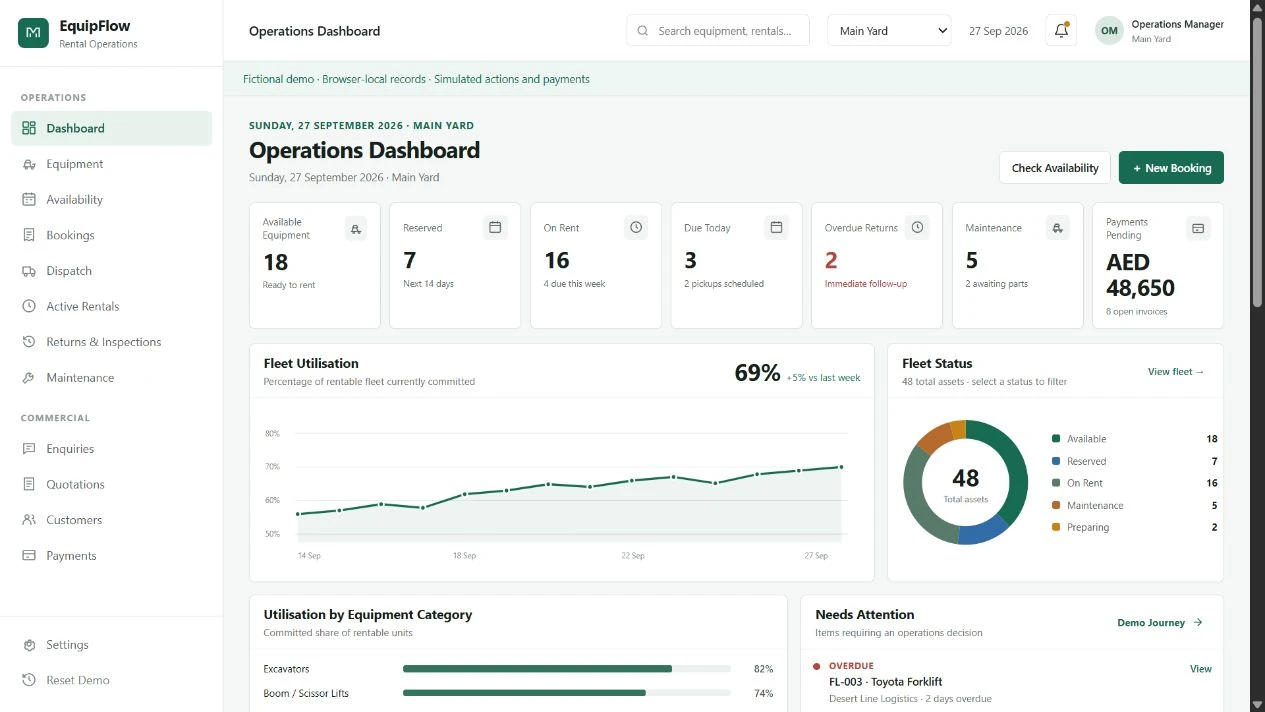
Explore a public rental workflow with availability, bookings, dispatch, inspections and maintenance. The screenshot shows fictional data and simulated payments.
Explore EquipFlow demoOpens Fusion Ventures’ public demo in a new tab. Production features, integrations and local requirements need confirmation.
Operational benefits to work toward, with the records and responsibilities to support them.
A confirmed reservation gives the dispatch team the dates, asset and destination it needs.
Item-level returns give accounts a basis for reviewing hire periods and extra charges.
Utilization and downtime records help distinguish a sales gap from equipment awaiting repair.
Bring examples of your accounting invoice, equipment register and dispatch documents. Discuss whether imports, invoice exports, telematics or maintenance systems have usable APIs, and who owns each record. No connector is confirmed until its access and mapping are reviewed.
Discuss integrations & customizationThe yard team needs readable dispatch lists and a practical way to capture return notes at handover. Accounts needs detailed contract and billing views on desktop. Validate connectivity, permissions and any photo-upload needs with the actual devices during the demo.
Clear scope makes for a better decision.
These are core requirements to review. Specify whether off-hire applies to an asset or quantity, how extensions are approved and how invoice periods are recalculated. Confirm the demonstrated behavior before agreeing scope.
Agree whether the denominator is calendar days, working days or available days, and whether maintenance is excluded. A useful report states the definition beside the figure.
Include cross-hire supplier references, operator availability and assignment rules in discovery. Their relationship to contracts and costs must be confirmed for your business.
Bring a sample quote, rental contract, asset register, dispatch note, return report and invoice with sensitive details removed. They reveal the exceptions a generic sales demo can miss.
Show us where the handoffs get difficult. We’ll discuss your requirements and confirm the right next step, including demo availability and a custom CRM quote.
No obligation. No assumed feature list. A practical conversation about your business.
WhatsApp Enquiry ayishamuneer4342@gmail.comContact Us