Skip to content

Travel agency CRM. From enquiry to a coordinated journey.

Travel agency CRM and booking workflow software should connect the conversation, the itinerary and the supplier commitments. Plan a shared record from the first enquiry through quotation, booking and payment follow-up.

Explore the actual demo. Shape the production scope around your business.

Actual Ayishamuneer travel coordination demo workspace with entirely fictional operational recordsView full screen
Actual self-hosted demo · fictional records
Actual Ayishamuneer travel coordination demo workspace with entirely fictional operational records
Industry workflowsWorking demonstrationsA clearer software decision

A revised itinerary can change every promise in a quote.

The traveller may see one proposal while the consultant coordinates hotels, transfers and activities with several suppliers. If confirmations and payment dates stay in separate chats, an accepted quote can still have unconfirmed services. A shared enquiry record should make those differences visible.

Illustrated travel planning desk with an itinerary, luggage and coastal destination
Industry illustration · AI-created scene, not a client project
  • Follow-ups disappear between consultants and shifts.

  • Outdated itinerary versions create pricing confusion.

  • Supplier confirmations and customer payments are mistaken for complete bookings.

Follow the work.
Understand each handoff.

A fictional family asks for a short city break. Assign a consultant, assemble the itinerary, review the quote, confirm the supplier and record a simulated deposit without making a real booking.

  1. Enquiry
  2. Lead
  3. Follow-up
  4. Itinerary
  5. Quotation
  6. Acceptance
  7. Supplier confirmation
  8. Booking
  9. Payment

Understand the journey

Capture dates, destination, travellers, budget and the decision maker’s requirements.

Plan & quote

Build the itinerary, check supplier terms and present a versioned quotation.

Confirm & coordinate

Record acceptance, supplier confirmations, service references and required payments.

Prepare & follow through

Review departure readiness, share agreed documents and track outstanding service or refund actions.

A process map for evaluation. The demo exposes a focused sample of these steps; production scope is agreed separately.

Look beyond the feature name.
See how the work changes.

For travel consultants, tour operators, destination management teams and agencies coordinating tailor-made trips or repeat corporate travel.

Enquiries, leads & follow-ups

Record source, destination, travel dates, party size, budget and the next action. Assign a consultant and review stale enquiries without assuming an unanswered message means the lead is lost.

In practice A sample family enquiry has a consultant’s next action. Change the follow-up to review the quotation.

Why it matters Keep the next conversation with the same customer record.

Explore the workflow
Actual Ayishamuneer travel coordination demo workspace with entirely fictional operational recordsView full screen
Actual self-hosted demo · fictional records
Actual Ayishamuneer travel coordination demo workspace with entirely fictional operational records

Itinerary planning

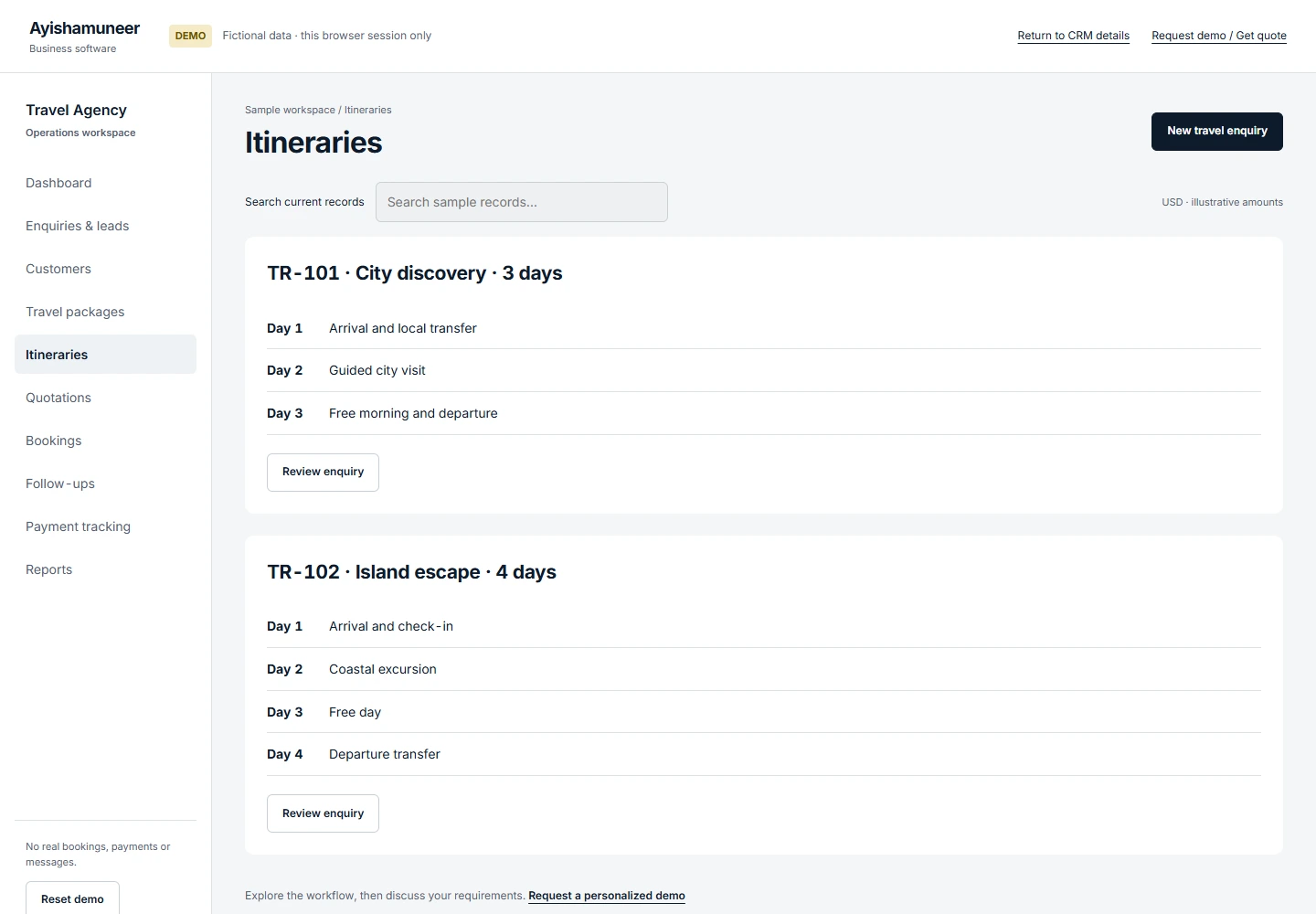
Organize the day-by-day journey with accommodation, transport and activities. Keep traveller preferences and exclusions visible and record which version was presented.

In practice Choose a city discovery or island escape package. Its day-by-day plan stays attached to the created enquiry.

Why it matters Review the proposed journey before treating it as a booking.

Explore the workflow

Itinerary planning

  1. Package

    Choose a fictional trip and party size

  2. Daily plan

    Keep activities linked to that package

  3. Quotation

    Price the same itinerary per traveller

Workflow explanation · review exact rules for your business.

Quotations & revisions

Show included services, validity, currency and commercial assumptions. Keep revision history so a changed hotel or travel date can be reviewed against the earlier offer.

In practice A package’s illustrative per-traveller amount is multiplied by the selected party size. The quote stays connected to the same itinerary.

Why it matters Make the price basis understandable without claiming live supplier rates.

Explore the workflow
Actual Ayishamuneer travel coordination demo workspace with entirely fictional operational recordsView full screen
Actual self-hosted demo · fictional records
Actual Ayishamuneer travel coordination demo workspace with entirely fictional operational records

Bookings & supplier coordination

Link service requests to suppliers, confirmation references and outstanding actions. Separate quotation acceptance from supplier confirmation, ticketing or voucher issuance.

In practice Accept the quotation, then try to book before supplier confirmation. The workflow requires the separate sample confirmation first.

Why it matters Distinguish the customer’s acceptance from supplier readiness.

Explore the workflow

Bookings & supplier coordination

  1. Accepted

    Customer approval is a commercial event

  2. Supplier confirmed

    Record confirmation before progressing

  3. Booked

    A fictional booking only; no external inventory call

Workflow explanation · review exact rules for your business.

Payments & communication

Track deposits, due dates, balances and refund follow-ups against the booking. Agree consent and message templates; do not include passport details or payment-card data in a sales enquiry.

In practice Record a simulated deposit and inspect the remaining balance. No card is charged and no supplier receives a request.

Why it matters Discuss payment milestones without implying a real transaction occurred.

Explore the workflow
Actual Ayishamuneer travel coordination demo workspace with entirely fictional operational recordsView full screen
Actual self-hosted demo · fictional records
Actual Ayishamuneer travel coordination demo workspace with entirely fictional operational records

Consultant & booking reports

Review follow-up activity, enquiry conversion, upcoming departures, unconfirmed services and outstanding balances. Define when a booking is counted and distinguish gross booking value from agency revenue.

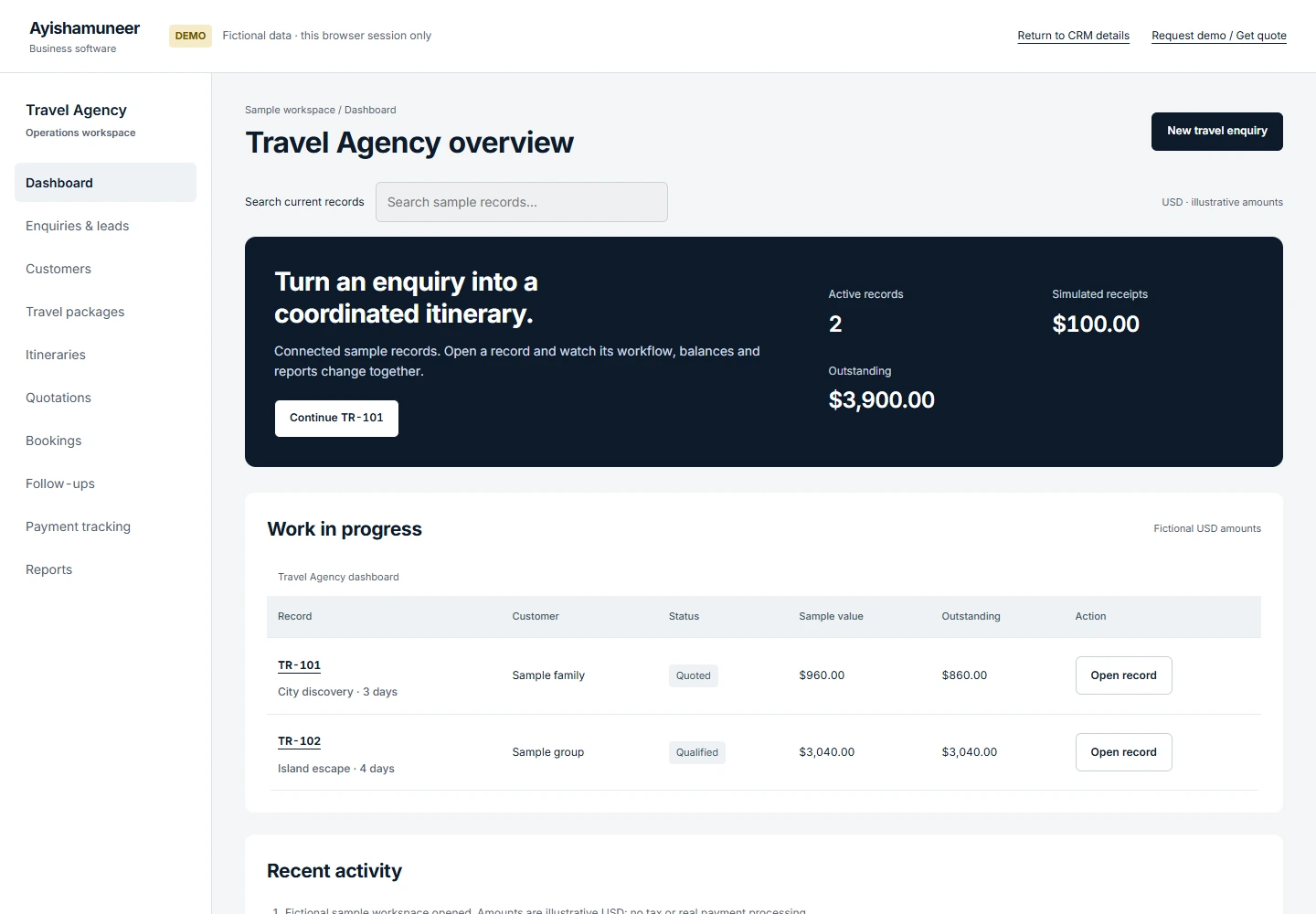
In practice Review enquiries at each stage, booked records and outstanding balances alongside the follow-up queue.

Why it matters Separate sales activity, confirmed coordination and payment follow-up.

Explore the workflow

Consultant & booking reports

  1. Enquiry stage

    Count the records at each current step

  2. Receipts

    Keep simulated payments with the booking record

  3. Outstanding

    Explain the balance through underlying enquiries

Workflow explanation · review exact rules for your business.

Open the workspace.
Try the next action.

Turn a travel enquiry into an organized booking record. These genuine captures come from the matching Ayishamuneer demo.

Actual Ayishamuneer travel coordination demo workspace with entirely fictional operational recordsView full screen
Actual self-hosted demo · fictional records
Actual Ayishamuneer travel coordination demo workspace with entirely fictional operational records
Actual Travel Agency demo operational module with fictional dataView full screen
Actual self-hosted demo · fictional records
Actual Travel Agency demo operational module with fictional data

DEMO · fictional records and simulated actions. No real payment, booking or customer data is involved.

Better context
for the next person.

Benefits to work toward, supported by records and responsibilities.

Enquiry → consultant

The next action and traveller brief stay visible when another consultant takes over.

Proposal → supplier

An accepted itinerary has a clear list of services still awaiting confirmation.

Booking → departure

Document and payment follow-ups can be reviewed before the traveller is due to leave.

Fit the system
to your operation.

Bring your booking sources, supplier processes and accounting requirements. GDS, airline, hotel inventory, payment and messaging integrations require provider agreements, API access and technical review. No live inventory, automatic ticketing or named connector is claimed.

Discuss customization

At the desk. Alongside the work.

Consultants may need to review follow-ups and trip status on a phone between appointments. Detailed itinerary editing and reconciliation need comfortable desktop views. Verify document handling, traveller privacy and device support in the agreed solution; offline access is not assumed.

The browser demo demonstrates local workflow behavior. Production access control, backups, integrations and deployment requirements need separate verification.

From a useful example
to your implementation plan.

Confirm what matters before deciding on a system.

  1. 1

    Discover

    Bring anonymized sample documents, current tools and handoffs that cause friction.

  2. 2

    Map

    Agree records, permissions, exceptions and what each status means.

  3. 3

    Validate

    Review devices, reports, migration and any integration with its provider.

  4. 4

    Agree

    Document modules, responsibilities, costs, support and rollout before commitment.

Before you choose
your next system.

Practical answers for a clearer decision.

What can I do in the travel agency demo?

Turn a travel enquiry into an organized booking record. Open the sample records and use the visible controls. All figures and customers are fictional.

Does a travel CRM include live flight or hotel inventory?

Not by assumption. A CRM can organize enquiries and booking coordination, while live inventory or ticketing depends on a separate provider integration, commercial agreement and verified technical support.

How should itinerary revisions be managed?

Keep each sent quotation tied to its itinerary version, date and validity. Confirm how changes to dates, suppliers, rates and exclusions are approved before a booking is updated.

Can payment and supplier confirmation be tracked separately?

They should be separate requirements. A paid deposit does not confirm a hotel, and a supplier reference does not prove the customer has settled the balance. Review both in the demo.

What information is safe for an initial enquiry?

Share business needs, booking volume ranges, current tools and workflow problems. Do not send passport scans, traveller identity details, bank credentials or card data.

Does this demo confirm every production feature?

No. The working demo proves the sample interactions you can inspect. Production modules, permissions, integrations, support and local requirements must be confirmed in a written scope.

Make an informed
software decision.

Use the travel agency example to map the fields, exceptions and handoffs your team needs.

Visit the Knowledge Hub

Read our current business and digital strategy resources.

Map your workflow

Identify the next action, responsible team and record that proves completion.

Discuss an implementation plan

Review data migration, devices, responsibilities and scope before commitment.

Let’s start with
how you work.

Show us where the handoffs get difficult. We’ll discuss your requirements and confirm the right next step, including demo availability and a custom CRM quote.

No obligation. No assumed feature list. A practical conversation about your business.

WhatsApp Enquiry ayishamuneer4342@gmail.comContact Us

Please don’t include passwords, identity documents or payment details.